
 Alex Trofimov
539b3e3de9
Icon and Splash using react-native-splash-screen & react-native-make
Alex Trofimov
539b3e3de9
Icon and Splash using react-native-splash-screen & react-native-make
|
7 éve | |
|---|---|---|
| __tests__ | 7 éve | |
| android | 7 éve | |
| img | 7 éve | |
| ios | 7 éve | |
| .buckconfig | 7 éve | |
| .eslintrc.js | 7 éve | |
| .flowconfig | 7 éve | |
| .gitattributes | 7 éve | |
| .gitignore | 7 éve | |
| .prettierrc.js | 7 éve | |
| .watchmanconfig | 7 éve | |
| App.js | 7 éve | |
| README.md | 7 éve | |
| app.json | 7 éve | |
| babel.config.js | 7 éve | |
| index.js | 7 éve | |
| metro.config.js | 7 éve | |
| package-lock.json | 7 éve | |
| package.json | 7 éve | |
| process-icon.sh | 7 éve | |
| process-splash.sh | 7 éve | |
| yarn.lock | 7 éve |
README.md
UNA Mobile Apps
This is source code of UNA mobile apps for iOS and Android based on ReactNative.
Mobile apps need to have Nexus UNA app installed.
Run
You need to have npm, react-native along with Android SDK and/or XCode along withg CocoaPods installed to build apps.
After downloading source code, unpacking it, then run:
npm install
Then you can already try to run Andoid app with the following commands (Android emulator must be already running):
export ANDROID_HOME=/path/to/android/sdk
react-native run-android
or iOS app (on Mac OSX only):
cd ios; pod install; cd ..
react-native run-ios
Changing display name and bundle identifier
Lest assume that you want to rename app to Kookaburra and site name is kookaburra.io.
Then you need to change the following strings:
UNA.IO => Kookaburra
com.una.android => com.kookaburra.android
com.una.ios => com.kookaburra.ios
una.io => kookaburra.io
In the following files and some files need to be renamed:
App.js
app.json

android/app/src/main/res/values/strings.xml
android/app/src/main/java/com/una/android/MainActivity.java => android/app/src/main/java/com/kookaburra/android/MainActivity.java
android/app/src/main/java/com/una/android/MainApplication.java => android/app/src/main/java/com/kookaburra/android/MainApplication.java
android/app/src/main/AndroidManifest.xml
android/app/BUCK
android/app/build.gradle
In XCode change the following (make sure to open una.xcworkspace):
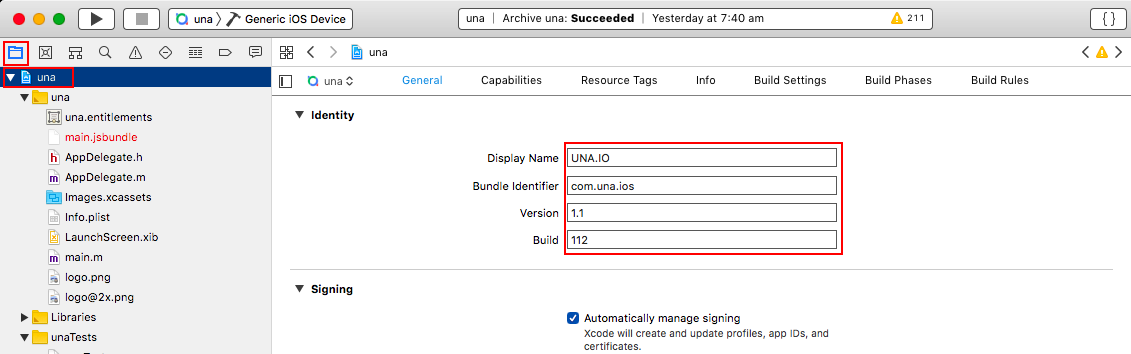
It will change the following files (don't edit these files directly):
ios/una/Info.plist
ios/una.xcodeproj/project.xcworkspace/xcuserdata/alex.xcuserdatad/UserInterfaceState.xcuserstate
ios/una.xcodeproj/project.pbxproj
Change images to your own
Change all images to your own in /img/ folder, leaving the same images dimensions.
To change launcher and icons for iOS and Android apps it's recommended to use special script, it can installed using the following command:
npm install -g yo generator-rn-toolbox
Then you can generate launcher images using the following commands:
yo rn-toolbox:assets --splash ./img/background.png --android
yo rn-toolbox:assets --splash ./img/background.png --ios
Icons for iOS app can be generated using the following command:
yo rn-toolbox:assets --icon ./img/icon.png --ios
To generate Icons for Android - export project (from /android/ folder) in Android Studio then:
- Right click on the app/res folder, then click on New and then click on Image Asset
- In the Icon Type field select Launcher Icons (Adaptive and Legacy)
- In the path field, select
icon-android.pngfile which is in/img/folder - Once done, click on the Next button and then on the Finish button